Did you know you can make saving just a little bit easier with a few clicks of a button? Take one thing off your financial to-do list by setting up automatic transfers into your Ally Bank Savings Account.
Read more: How Ally Bank’s buckets and boosters can help you save even more
Transfers between your Ally Bank accounts
If you’re moving money from one Ally Bank account to another, setting up recurring transfers is quick and easy.
Steps to take in the Ally app
Log in to your mobile app with your username and password.
Select “Transfers” from the main menu.
Select the account you want to transfer money from and the account you want to transfer money to.
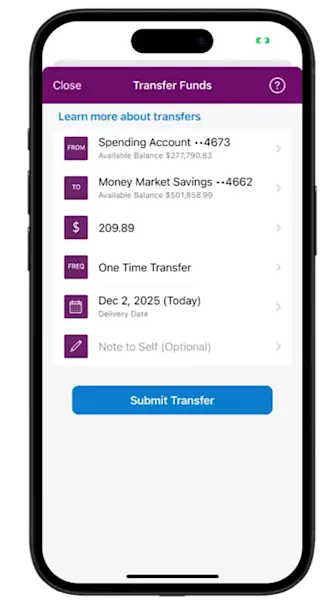
Enter the transfer amount.
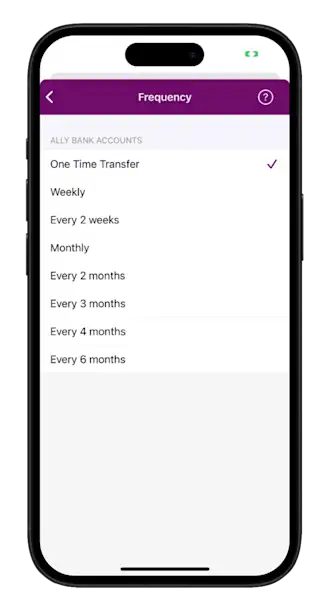
Set the frequency, and you’re all set.
Steps to take on a desktop
Go to Ally.com and log in to online banking with your username and password.
Choose “Transfers” and then select “Bank Transfers.”
Select the account the money is coming from and the account the money is going to.
Enter the amount you want to transfer.
Set the frequency.
If you’re moving money from one Ally Bank account to another, setting up recurring transfers is quick and easy.
Once you’re all set up, check back periodically to confirm your transfers are scheduled correctly. Then sit back and watch your savings balance grow (that part never gets old).
Tip: There could be limits on some withdrawals and transfers out of certain accounts, so remember to check those limits with your financial institution before setting up your new recurring transfer.
Transfers between your Ally Bank account and another bank
Setting up recurring transfers from an account at another bank to your Ally Bank Savings Account requires a couple of additional steps for your protection, but it’s still simple.
Go to Ally.com and log in with your username and password.
Choose “Transfers” and then “Bank Transfers.”
Choose “Link other accounts.”
Enter the information for the external account:
Account type
Account nickname
Routing number
Account number
Depending on where your external account is held, you may be able to link the account instantaneously or by providing login information. Otherwise, we will make small trial deposits (less than $1.00 each) into the external account within three business days.
After your external account information is linked to your Ally Bank account, you can set up automatic transfers following the same steps as you would with your Ally Bank accounts.
Advantages of setting up recurring transfers
There are several benefits to automatically moving funds into your savings account, including:
Building a consistent habit: “Paying yourself first” can help ensure that your account stays funded and your savings grow before you have a chance to spend your money on other things.
Accelerating your savings: Consistency, even in small amounts, can add up significantly over time.
Reducing stress: A steadily growing savings account can give you peace of mind that you’re building a reliable safety net.
Stay more on track with buckets and boosters
Once you’ve set up recurring transfers, take your savings to the next level with tools to help expedite your money goals. Ally Bank's buckets and boosters are smart tools that help you save toward specific goals and optimize your savings. Think of buckets like digital envelopes. For example, you might have one for a vacation fund and another for a down payment on a home. By organizing your savings for different purposes in a single account, you'll be more motivated as you move toward your total.
And don’t forget boosters (aka tools that speed up your savings by doing some of the work for you). Our boosters provide a few different benefits, like rounding up your spending to the nearest dollar and automatically transferring the difference to your savings account.
Keep an eye on your account
Once you automate your savings deposits, you can spend less time and energy on saving consistently — but don’t forget to check on your accounts from time to time to keep up with your transfers and to spot any unauthorized activity. Download the Ally Mobile app, so your account details are right at your fingertips.
You can also get help with new accounts, check balances, transfer money, deposit checks and more — 24/7 at Ally.com or at 877-247-ALLY (2559).